话题通信
概念
在 ROS 2 里,话题就像一个广播频道,用来让不同的程序模块(称为节点)互相传递信息。一个节点可以向某个话题“发消息”,这一动作称为发布;另一个节点可以“收听”这个话题,这一动作称为订阅,这样它们就能共享数据。
话题通信不仅可以是一对一的(你说我听),还可以是一对多、多对一、多对多。此外,一个节点也可以订阅自己发布的话题。 一对一: 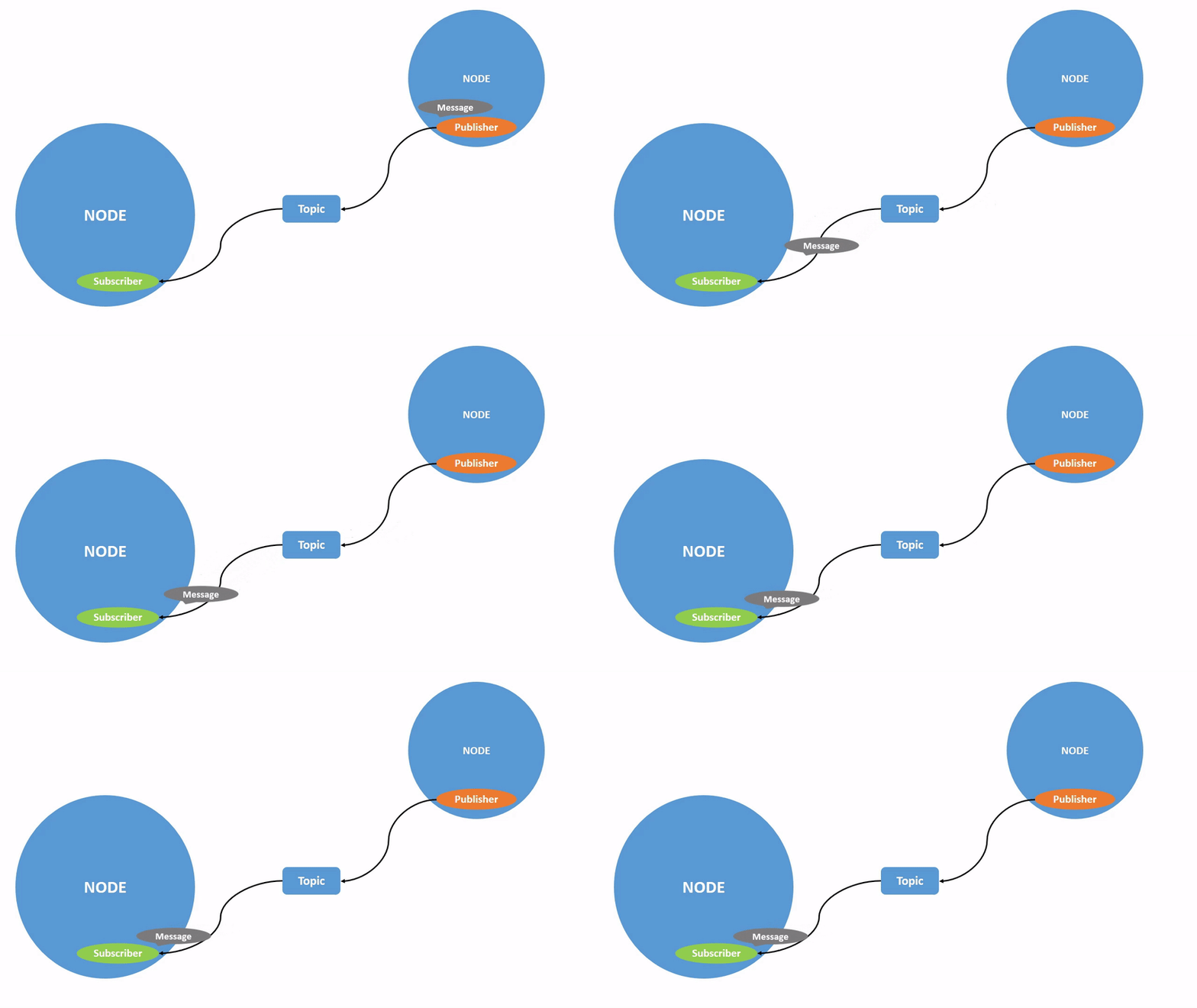
一对多、多对一、多对多: 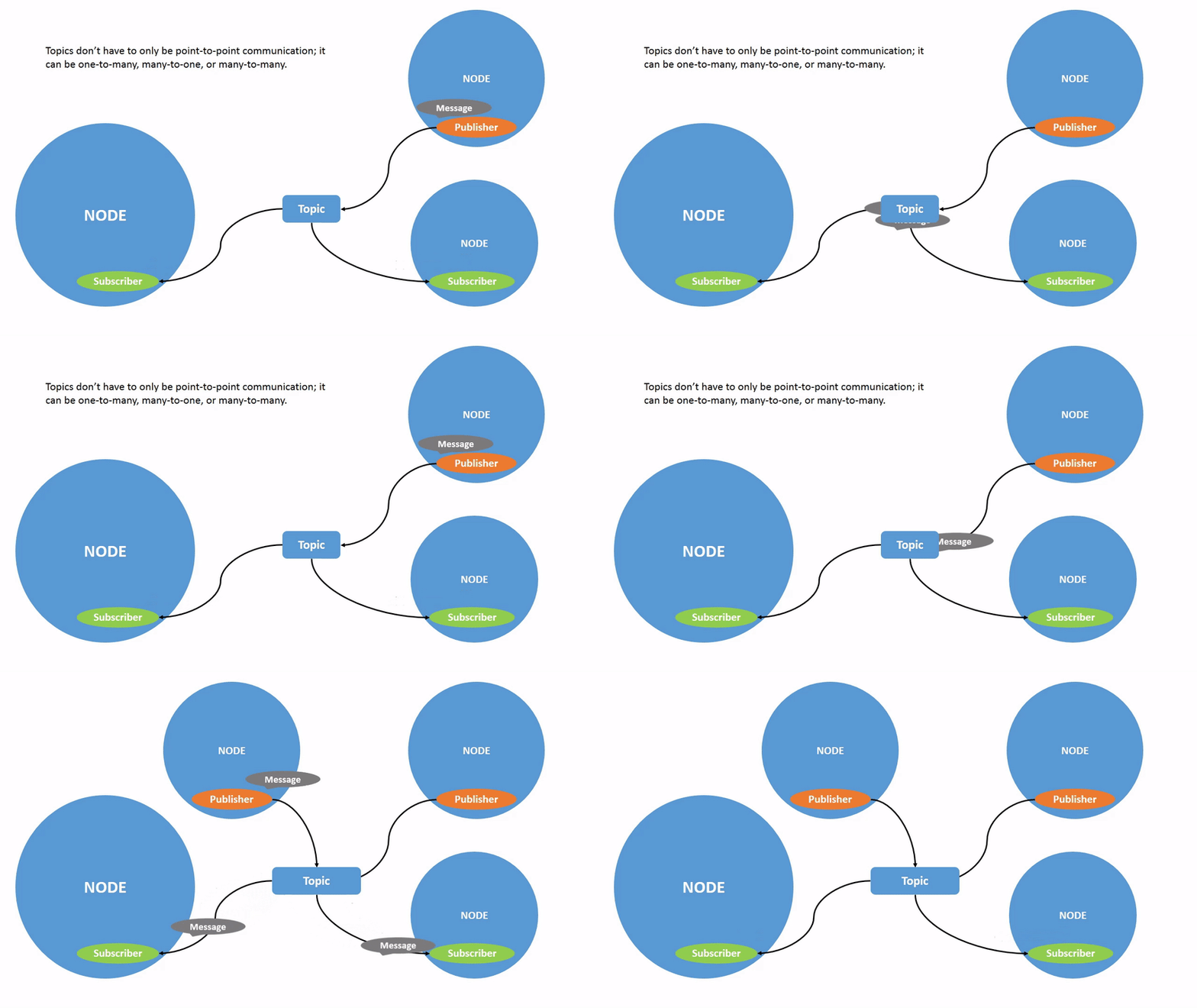
相较于传统的多进程通信,订阅发布模式的优势在于解耦,发布者和订阅者不需要知道对方的存在,只需要知道话题的名字即可。
在本节教程中,我们将以发布个人信息为例,学习如何创建话题接口,如何创建发布者和订阅者,以及如何发布和接收消息。
话题通信的基本流程
- 创建话题接口(数据结构)
- 创建发布者
- 创建订阅者
- 发布者发布消息
- 订阅者接收消息
创建话题接口
我们创建话题接口的方式和创建功能包的方式一样,话题接口本质上也是一种功能包,只不过它只包含一类文件——消息文件。话题的本质就是数据结构,在C/C++中,我们可以用结构体来定义数据结构,如下所示:
struct AddressBook
{
    uint8_t phone_type;
    std::string first_name;
    std::string last_name;
    std::string phone_number;
};
在ROS2中,我们使用.msg文件来定义话题通信的数据结构,使用.srv文件来定义服务通信的数据结构。在本教程中,我们将创建一个自定义的.msg文件,然后在单独的包中使用它。
创建消息功能包
首先进入我们的刚刚创建的工作空间的src目录下
cd ~/ros2_ws/src然后输入以下命令创建一个名为more_interfaces的包,使用ament_cmake编译方式,依赖rosidl_default_generators和builtin_interfaces。
ros2 pkg create more_interfaces --build-type ament_cmake --license Apache-2.0 --dependencies rosidl_default_generators builtin_interfaces在more_interfaces包中创建一个名为msg的文件夹
mkdir more_interfaces/msg
cd more_interfaces/msg
接着在more_interfaces/msg,创建一个新文件AddressBook.msg。
touch AddressBook.msg文件结构如下:
.
├── CMakeLists.txt
├── LICENSE
├── msg
│   └── AddressBook.msg
└── package.xml
编辑AddressBook.msg文件,添加以下内容:
uint8 PHONE_TYPE_HOME=0
uint8 PHONE_TYPE_WORK=1
uint8 PHONE_TYPE_MOBILE=2

string first_name
string last_name
string phone_number
uint8 phone_type
修改CMakeLists.txt
在more_interfaces包中,打开CMakeLists.txt文件,添加以下内容:
cmake_minimum_required(VERSION 3.8)
project(more_interfaces)

if(CMAKE_COMPILER_IS_GNUCXX OR CMAKE_CXX_COMPILER_ID MATCHES "Clang")
  add_compile_options(-Wall -Wextra -Wpedantic)
endif()

# find dependencies
find_package(ament_cmake REQUIRED)
find_package(rosidl_default_generators REQUIRED)
find_package(builtin_interfaces REQUIRED)
# 生成接口
rosidl_generate_interfaces(${PROJECT_NAME}
  "msg/AddressBook.msg" #此处为自定义接口.msg
  DEPENDENCIES builtin_interfaces
)

if(BUILD_TESTING)
  find_package(ament_lint_auto REQUIRED)
  # the following line skips the linter which checks for copyrights
  # comment the line when a copyright and license is added to all source files
  set(ament_cmake_copyright_FOUND TRUE)
  # the following line skips cpplint (only works in a git repo)
  # comment the line when this package is in a git repo and when
  # a copyright and license is added to all source files
  set(ament_cmake_cpplint_FOUND TRUE)
  ament_lint_auto_find_test_dependencies()
endif()

ament_package()
修改package.xml
在话题消息接口文件夹下package.xml中添加以下内容:
<?xml version="1.0"?>
<?xml-model href="http://download.ros.org/schema/package_format3.xsd" schematypens="http://www.w3.org/2001/XMLSchema"?>
<package format="3">
<name>more_interfaces</name>
<version>0.0.0</version>
<description>Package description</description>
<maintainer email="[email protected]">shidong</maintainer>
<license>Apache-2.0</license>
<buildtool_depend>ament_cmake</buildtool_depend>
<buildtool_depend>rosidl_default_generators</buildtool_depend>
编译消息接口功能包
在工作空间目录下,输入以下命令编译功能包:
colcon buildsource install/setup.bash查看消息接口
在终端输入以下命令查看消息接口:
ros2 interface show more_interfaces/msg/AddressBook若输出以下内容,则说明消息接口创建成功:
uint8 PHONE_TYPE_HOME=0
uint8 PHONE_TYPE_WORK=1
uint8 PHONE_TYPE_MOBILE=2

string first_name
string last_name
string phone_number
uint8 phone_type
创建发布/订阅节点
创建任务功能包
在工作空间的src目录下,输入以下命令创建一个名为address_book的包,使用ament_cmake编译方式,依赖rclcpp和more_interfaces。一般来说,如果一个节点要使用自定义消息接口,就需要为它添加对应的依赖。
ros2 pkg create address_book --build-type ament_cmake --dependencies rclcpp more_interfaces编写发布者的源文件
在 address_book/src 下创建 publish_address_book.cpp、subscribe_address_book.cpp 两个文件,并修改CMakeLists.txt、package.xml文件。
#include <chrono> // 用于时间管理(计时器功能)
#include <memory> // 用于智能指针的管理

#include "rclcpp/rclcpp.hpp" // ROS 2 的核心头文件
#include "more_interfaces/msg/address_book.hpp" // 包含自定义消息 AddressBook 的定义

using namespace std::chrono_literals; // 方便使用时间单位(如 1s 表示 1 秒)

// 创建一个发布者节点类,继承自 rclcpp::Node
class AddressBookPublisher : public rclcpp::Node
{
public:
  // 构造函数:创建一个名为 "address_book_publisher" 的节点
  AddressBookPublisher()
  : Node("address_book_publisher")
  {
    // 创建一个发布者,用于发布 AddressBook 类型的消息到 "address_book" 话题
    address_book_publisher_ =
      this->create_publisher<more_interfaces::msg::AddressBook>("address_book", 10);

    // 定义一个发布消息的回调函数
    auto publish_msg = [this]() -> void {
        // 创建一个 AddressBook 消息实例
        auto message = more_interfaces::msg::AddressBook();

        // 填充消息中的字段
        message.first_name = "John";                // 设置名字为 John
        message.last_name = "Doe";                 // 设置姓氏为 Doe
        message.phone_number = "1234567890";       // 设置电话号码
        message.phone_type = message.PHONE_TYPE_MOBILE; // 设置电话类型为移动电话

        // 在控制台打印发布的消息内容
        std::cout << "Publishing Contact\nFirst: " << message.first_name <<
          "  Last: " << message.last_name << std::endl;

        // 发布消息到 "address_book" 话题
        this->address_book_publisher_->publish(message);
      };

    // 创建一个定时器,每隔 1 秒调用一次 `publish_msg` 回调函数
    timer_ = this->create_wall_timer(1s, publish_msg);
  }

private:
  // 定义发布者和计时器的私有成员变量
  rclcpp::Publisher<more_interfaces::msg::AddressBook>::SharedPtr address_book_publisher_; // 发布者
  rclcpp::TimerBase::SharedPtr timer_; // 定时器
};

// 主函数
int main(int argc, char * argv[])
{
  // 初始化 ROS 2 节点系统
  rclcpp::init(argc, argv);

  // 启动节点,并运行 AddressBookPublisher 对象
  rclcpp::spin(std::make_shared<AddressBookPublisher>());

  // 节点关闭后清理资源
  rclcpp::shutdown();

  return 0;
}#include <memory> // 用于智能指针管理
#include "rclcpp/rclcpp.hpp" // ROS 2 的核心头文件
#include "more_interfaces/msg/address_book.hpp" // 包含自定义消息 AddressBook 的定义
// 创建一个订阅者节点类,继承自 rclcpp::Node
class AddressBookSubscriber : public rclcpp::Node
{
public:
// 构造函数:创建一个名为 "address_book_subscriber" 的节点
AddressBookSubscriber()
: Node("address_book_subscriber")
{
// 创建一个订阅者,订阅 "address_book" 话题
// 消息类型为 AddressBook,队列深度为 10
// 使用 std::bind 将回调函数绑定到订阅者,当收到消息时调用回调函数
address_book_subscription_ = this->create_subscription<more_interfaces::msg::AddressBook>(
"address_book", 10, std::bind(&AddressBookSubscriber::address_book_callback, this, std::placeholders::_1));
}
private:
// 回调函数:当订阅者接收到 AddressBook 消息时调用
void address_book_callback(const more_interfaces::msg::AddressBook::SharedPtr msg) const
{
// 使用 ROS 2 的日志工具输出接收到的消息内容
RCLCPP_INFO(this->get_logger(), "Received Contact:\nFirst: %s\nLast: %s\nPhone: %s\nType: %d",
msg->first_name.c_str(), // 输出名字
msg->last_name.c_str(), // 输出姓氏
msg->phone_number.c_str(), // 输出电话号码
msg->phone_type); // 输出电话类型(0: 家庭, 1: 工作, 2: 移动)
}
// 私有成员变量,用于存储订阅者对象
rclcpp::Subscription<more_interfaces::msg::AddressBook>::SharedPtr address_book_subscription_;
};
// 主函数
int main(int argc, char * argv[])
{
// 初始化 ROS 2 节点系统
rclcpp::init(argc, argv);
// 启动节点,并运行 AddressBookSubscriber 对象
rclcpp::spin(std::make_shared<AddressBookSubscriber>());
// 节点关闭后清理资源
rclcpp::shutdown();
return 0;
}cmake_minimum_required(VERSION 3.8)
project(address_book)
if(CMAKE_COMPILER_IS_GNUCXX OR CMAKE_CXX_COMPILER_ID MATCHES "Clang")
add_compile_options(-Wall -Wextra -Wpedantic)
endif()
# find dependencies
find_package(ament_cmake REQUIRED)
find_package(rclcpp REQUIRED)
find_package(more_interfaces REQUIRED)
# Add publisher executable//
add_executable(publish_address_book src/publish_address_book.cpp)// [!code focus]
ament_target_dependencies(publish_address_book rclcpp more_interfaces)// [!code focus]
# Add subscriber executable//
add_executable(subscribe_address_book src/subscribe_address_book.cpp)// [!code focus]
ament_target_dependencies(subscribe_address_book rclcpp more_interfaces)// [!code focus]
if(BUILD_TESTING)
find_package(ament_lint_auto REQUIRED)
# the following line skips the linter which checks for copyrights
# comment the line when a copyright and license is added to all source files
set(ament_cmake_copyright_FOUND TRUE)
# the following line skips cpplint (only works in a git repo)
# comment the line when this package is in a git repo and when
# a copyright and license is added to all source files
set(ament_cmake_cpplint_FOUND TRUE)
ament_lint_auto_find_test_dependencies()
endif()
install(TARGETS// [!code focus]
publish_address_book// [!code focus]
subscribe_address_book// [!code focus]
DESTINATION lib/${PROJECT_NAME}
)// [!code focus]
ament_package()<?xml version="1.0"?>
<?xml-model href="http://download.ros.org/schema/package_format3.xsd" schematypens="http://www.w3.org/2001/XMLSchema"?>
<package format="3">
<name>address_book</name>
<version>0.0.0</version>
<description>TODO: Package description</description>
<maintainer email="[email protected]">shidong</maintainer>
<license>TODO: License declaration</license>
<buildtool_depend>ament_cmake</buildtool_depend>
<depend>rclcpp</depend>
<depend>more_interfaces</depend>// [!code focus]
<test_depend>ament_lint_auto</test_depend>
<test_depend>ament_lint_common</test_depend>
<export>
<build_type>ament_cmake</build_type>
</export>
</package>功能测试
编译测试订阅发布节点
在工作空间目录下,输入以下命令编译功能包:
colcon build运行发布者
在终端输入以下命令运行发布者:
source install/setup.bashros2 run address_book publish_address_book运行订阅者
在新建终端输入以下命令运行订阅者:
source install/setup.bashros2 run address_book subscribe_address_book查看输出
如果发布者正常运行,终端将会输出以下内容:
...
Publishing Contact
First: John  Last: Doe
Publishing Contact
First: John  Last: Doe
Publishing Contact
First: John  Last: Doe
Publishing Contact
First: John  Last: Doe
...
如果订阅者正常运行,终端将会输出以下内容:
...
[INFO] [1733120412.862185972] [address_book_subscriber]: Received Contact:
First: John
Last: Doe
Phone: 1234567890
Type: 2
...
至此,我们已经成功创建了一个发布者和一个订阅者,发布者发布了一个包含个人信息的消息,订阅者接收并打印了这个消息。